
Accessibility
Audio description
Films and series with a described sound track, found and played for you.
- Mark: Reviewed
- Mark: Starboard's own
- Version 1.5.0
At a glance
- Reviewed
- 23 November 2026, version 1.5.0
- Works with
- Jellyfin only
- Starboard
- Needs Starboard 0.18 or later
- Memory use
- Memory use not measured yet
- On a test server
- About 13 MB of memory on a test server
What it does
Audio description is a second sound track in which a narrator says what is happening in the picture. Once a night, in quiet hours, this plug-in reads the sound tracks in Jellyfin and lists the films and episodes that have one. Commentary tracks never count.
It tags each described title in Jellyfin, can gather them into one Audio description collection, and for each person you choose it can ask their app to switch to the described track. It also checks whether Reelix prefers releases with audio description, and links to places that offer it.
Made by TheMightyTRexUK. Licence: MIT.
- audio description
- accessibility
- blind
- partially sighted
- described video
- jellyfin
- narration
- sound track
- screen reader
- visually impaired
Who it is for
People who are blind or partially sighted, or who set up a server for someone who is, and want to find the described films and series in Jellyfin and keep the described track switched on.
What you will see
Two dashboard cards: Audio description, a count of described titles, and Recently found with audio description, the newest ten. Its settings page has Titles with audio description, listing films and series, People who want audio description, Audio description elsewhere, and search links for AudioVault, YouDescribe, MovieReading and Earcatch.
Pictures

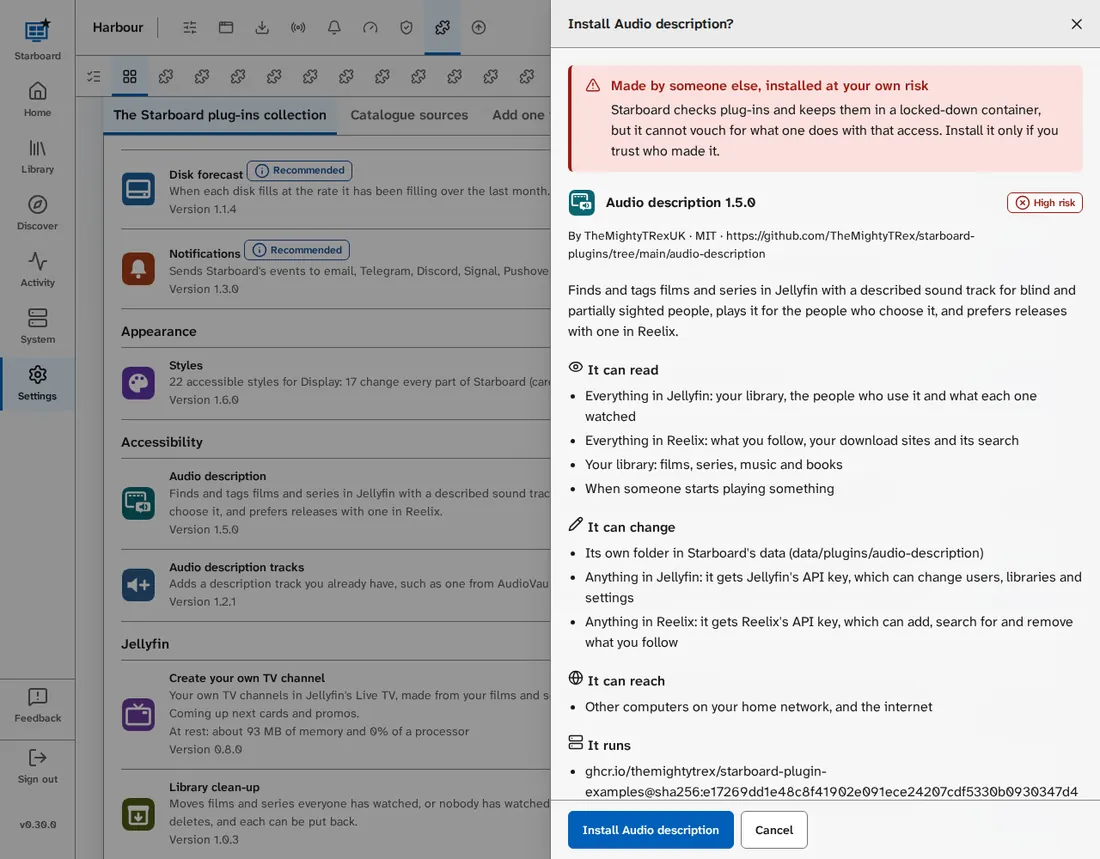
Real screenshots from a test copy of Starboard that holds made-up data only. Select a picture to open it full size.
What it can read and change
Starboard asks you before it gives a plug-in any of these. You can take one away later in Settings, then Plug-ins.
- Reads and changesUse your Jellyfin key
Signs in to Jellyfin as a helper, so it can find, tag or play titles.
jellyfin:key - Reads and changesUse your Reelix key
Talks to Reelix to find, prefer or manage releases.
reelix:key - ReadsRead the names of your media
Reads the titles and details of your films, series and books. It does not read the files.
media:read - Reads and changesTalk to things on your home network
Connects to apps and devices at home, and to the internet.
network:lan
It can read
- Use your Jellyfin key
- Use your Reelix key
- Read the names of your media
- Talk to things on your home network
It can change
- Use your Jellyfin key
- Use your Reelix key
- Talk to things on your home network
What it needs
- Starboard
- Needs Starboard 0.18 or later. Its manifest asks for plug-in API 1.14 or later, up to but not including 2.0.
- Other apps
- Jellyfin and Reelix, already set up.
- In practice
- Jellyfin added to Starboard, and plug-in API 1.14 or later. A Reelix key is optional: it is used only to read Reelix's Audio description format for the Reelix check, and the rest works without it. It never downloads from AudioVault or any other site.
- System tags
- jellyfin. These are the names in the manifest that Starboard checks before it adds the plug-in.
- A web page
- No. It shows on the Starboard dashboard.
What it uses
Two kinds of figure appear here, and each row says which. Measured figures were read from a running plug-in. Declared figures are limits written in its manifest. Where nothing is measured, it says so.
| What | Figure | Kind | Note |
|---|---|---|---|
| Memory at rest | Not measured yet | Not measured | |
| Most memory seen | Not measured yet | Not measured | |
| Memory limit it is given | 64 MB | Declared | The most it may use before Docker stops it. |
| Processor at rest | Not measured yet | Not measured | |
| Processor limit | 0.25 of a core | Declared | |
| Image on disk, unpacked | Not measured yet | Not measured | |
| Disk for its own data | Not measured yet | Not measured | Its folder in Starboard's data. |
| Network | Your home network and the internet. | Declared | main: port 8080 |
| Containers | 1 (main) | Declared | |
| Runs | Only when needed, and rests after 10 minutes with nothing to do | Declared | |
| Asks to read or change | 4 things: the list above | Declared |
Nobody has measured this plug-in on a running server yet, so no memory or processor figure is shown. The limits marked Declared are what its manifest allows, not what it uses.
Measured on a test server
Measured on a test server with made-up data, 25 November 2026, Starboard 0.30.0. Machine: Linux x86_64, 12 cores, 16 GB memory. These are not figures from a real server.
| What | Figure |
|---|---|
| Memory use, idle after start | About 12 MB |
| Memory use, after it was used | About 13 MB |
| Processor, averaged over 60 seconds idle | About 0 % of one core |
| Image size, unpacked | About 62 MB |
| Containers | 1 |
Versions and notes
Version 1.5.0
Latest17 November 2026Added
- Films to list and Series to list: how many Titles with audio description lists of each: All, or the last 10, 20, 50, 100 or 500 added to Jellyfin, newest first. Last 20 by default. A series counts by its newest described episode and still lists all its described episodes.
- The page says how many it shows, such as "Showing the last 20 of 143 films", and where to change it.
Changed
- Newest first: the films and series are listed by when they were added to Jellyfin, newest first. The nightly check keeps that date; select Check for described titles now once after updating.
Version 1.4.0
17 November 2026Added
- Titles with audio description: every film, and every described episode by series, with its year, its described track and its status in words. Films and Series show their counts, and each title opens its page in Jellyfin. The same page as in Jellyfin's own Audio description plug-in.
- Jellyfin address for links: the address you open Jellyfin at, for the links on Titles with audio description, when Starboard reaches Jellyfin at an address a browser cannot open.
Changed
- The nightly check keeps a little more: each title's Jellyfin id and year, and which episodes are described, for the page. Select Check for described titles now once after updating to fill it.
Fixed
- Films in the collection: the nightly check asks Jellyfin for each film, not the Audio description collection in their place, so once the collection was made, films in it no longer dropped out of the check and lost their tag.
Version 1.3.0
17 November 2026Added
- Find and tag: each film and episode with a described sound track, and its series, gets the tag Audio description in Jellyfin at the nightly check, and the tag comes off when the track goes. Every Jellyfin app, televisions included, can filter by it.
- The Audio description collection: activated by default, the films and series with a described track are in one Jellyfin collection. Deactivate Add them to the Audio description collection to leave it as it is.
- Play the described track: for each person you activate on its page, inactive until chosen. When they start a title with a described track and another plays, Starboard asks their app to change to it. Not every Jellyfin app accepts this.
- Rules 1.0: the same rules file as Jellyfin's own Audio description plug-in. When that plug-in is installed, this one leaves the tag, the collection and Play the described track to it, and its card says Idle.
Changed
- A new logo: a film frame with a speech bubble holding a loudspeaker, to match the Jellyfin version.
- It hears when playback starts: it asks to read what is playing (media:read), so Starboard tells it when someone starts a film.
- Check the Reelix choice now: was Apply the Reelix choice now, and its job is Check the audio description choice in Reelix: both now only read Reelix and say what to do.
Fixed
- Reelix (issue #144): it no longer tries to add a format to Reelix or change its quality levels, which Reelix refuses to all but an admin key. It reads Reelix's own Audio description format and says to set it to Prefer in Settings, Reelix, Picture quality. The job no longer fails.
Version 1.2.3
17 November 2026Changed
- Clearer words: Look for described titles now is now Check for described titles now, and its job is Check for titles with audio description. Its messages put the settings they name in quotation marks and spell out RNIB.
- Logo description: where its logo stands on its own, a screen reader says "Audio description logo", the plug-in's name, instead of a description of the symbol.
Version 1.2.2
17 November 2026Fixed
- Jellyfin 12: it sends Jellyfin's key the way Jellyfin 12 asks for it, so Jellyfin no longer refuses its requests where legacy authorisation is off. Older Jellyfin still works.
Version 1.2.1
16 November 2026Changed
- Lighter at rest: it wakes about once a minute while nothing asks it anything, not twice a second, and writes nothing to its folder when a run goes well.
- Starts faster: its image comes with Python's modules already compiled, so a start takes about a quarter of the processor time.
Version 1.2.0
15 November 2026Added
- A logo in Settings, Plug-ins, in the Catalogue and on its dashboard cards.
- Its cards say how things are: a status and when they last changed, in the grey band at the top of each card.
- Updates safely: before an update it finishes what it is doing and starts nothing new.
Changed
- Needs Starboard with plug-in API 1.14 or later. A Starboard with an older plug-in API keeps version 1.1.0.
Version 1.1.0
13 November 2026Added
- AudioVault search links: for each film and series without audio description, a link to AudioVault's own search. Deactivated until you activate it in Sources; Starboard never downloads from AudioVault
- YouDescribe search links: for each film and series, a link to YouDescribe's own search, where volunteers describe YouTube videos such as trailers
- MovieReading and Earcatch: how to use these phone apps alongside Jellyfin, which play a description in step by listening, and where to get them
Changed
- Audio description elsewhere: each place is now a link that opens in a new tab
Version 1.0.0
13 November 2026Added
- Finds the films and series in Jellyfin with a described sound track, once a night in quiet hours
- Prefers releases with audio description in Reelix
- People who want audio description: Jellyfin remembers the sound track each of them chooses
- Audio description elsewhere, and two dashboard cards
Older versions Starboard can fall back to: 1.1.0.
Help
The plug-in help centre explains what Audio description does, how to set it up and what to do when it does not work.
How to install in Starboard
From Starboard
- In Starboard, open Settings, then Plug-ins, then Catalogue.
- Under Catalogue sources, paste
https://themightytrex.github.io/stallboard/catalogue.jsonand select Add catalogue. You do this once. - Find Audio description in the Catalogue and select Install. Starboard shows what it asks for, and you choose.
By address
Or give Starboard this plug-in's address: in Settings, then Plug-ins, then Catalogue, paste it under Add one from elsewhere.
https://raw.githubusercontent.com/TheMightyTRex/starboard-plugins/ef67f0c273140fd80637bd3b9c8feb7ed15b648f/audio-description/starboard-plugin.json
Who reviewed it
Reviewed by TheMightyTRexUK on 23 November 2026, version 1.5.0. Listed on 23 November 2026. Its manifest was last read on 23 November 2026. What Reviewed means.
Report a problem with this plug-in
Something wrong with Audio description itself? Tell its maker. The report goes to the plug-in's own issue page, not to Stallboard.
Report a problem with this plug-in (opens in a new tab)
A problem with Stallboard, such as this page? Use the Send feedback button.
More in Accessibility
-

Audio description tracks
Accessibility
Add a description track you already own to its film in Jellyfin.
- Jellyfin only
Needs Starboard 0.18 or later
Memory use not measured yet