
Apps you can add
Themearr
A theme tune on the page of each film.
- Mark: Reviewed
- Mark: Starboard's own
- Version 1.0.0
At a glance
- Reviewed
- 23 November 2026, version 1.0.0
- Works with
- Jellyfin only
- Starboard
- Needs Starboard 0.18 or later
- Memory use
- Maker says about 48 MB of memory at rest
- On a test server
- It did not run on the test server
What it does
Themearr reads the films Reelix has, finds each film's theme tune on YouTube and saves it as theme.mp3 beside the film. Jellyfin, Plex, Emby and Kodi then find it and can play it while you browse.
It fetches tunes through the youtube-mp36 service on RapidAPI, and by default does this by itself for new films. The tunes are full length unless you choose trimming, about 3.7 GB for every 1,000 films.
Made by TheMightyTRexUK. Licence: MIT.
- theme tunes
- theme music
- theme.mp3
- film music
- movie themes
- jellyfin
- soundtrack
- reelix
- rapidapi
Who it is for
People who like a film's music to play while they browse it in Jellyfin, and who are happy to make a RapidAPI account for the key.
What you will see
One dashboard card, Film theme tunes, showing how many films have a theme and how many do not, with a status. Its settings tab has the RapidAPI key, user name, a switch to fetch tunes by itself and Sign in to Themearr, with the token for its own page.
Pictures

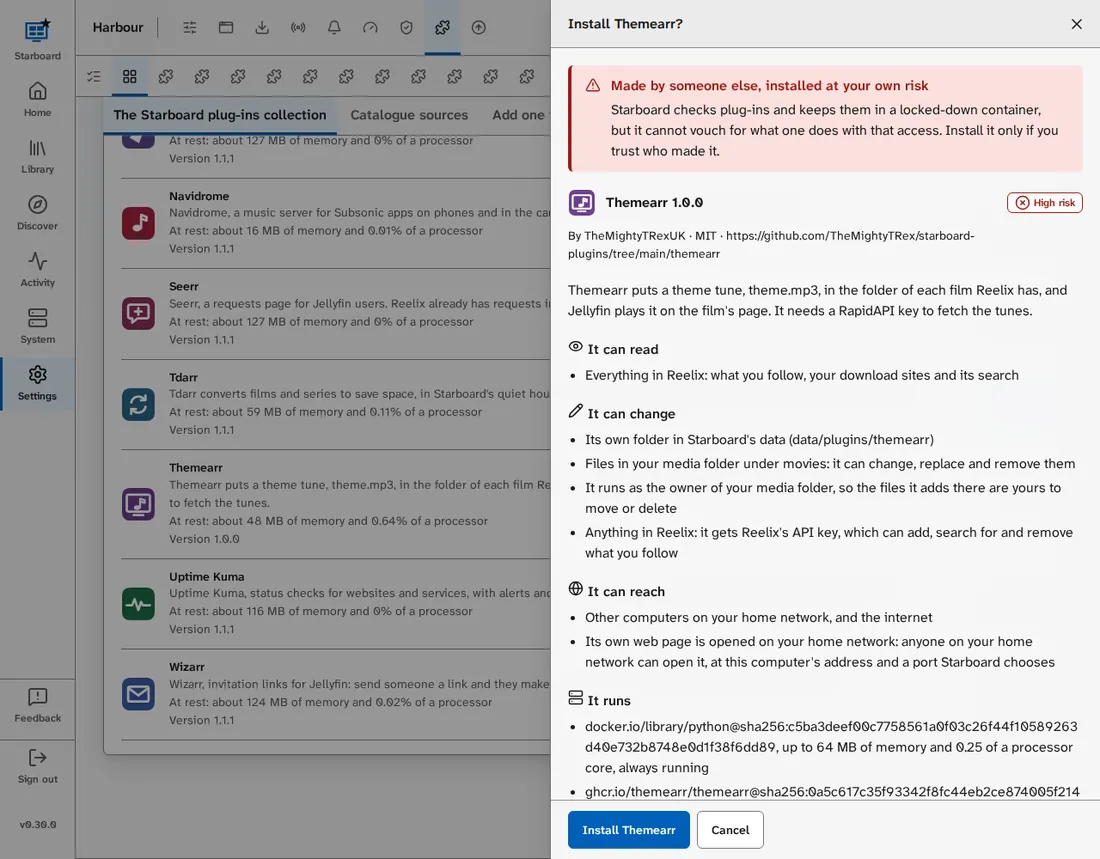
Real screenshots from a test copy of Starboard that holds made-up data only. Select a picture to open it full size.
What it can read and change
Starboard asks you before it gives a plug-in any of these. You can take one away later in Settings, then Plug-ins.
- Reads and changesUse your Reelix key
Talks to Reelix to find, prefer or manage releases.
reelix:key - Reads and changesTalk to things on your home network
Connects to apps and devices at home, and to the internet.
network:lan - ChangesOpen its own web page
Gives the app a page on your server, which you open in a browser.
network:port
It can read
- Use your Reelix key
- Talk to things on your home network
It can change
- Use your Reelix key
- Talk to things on your home network
- Open its own web page
What it needs
- Starboard
- Needs Starboard 0.18 or later. Its manifest asks for plug-in API 1.14 or later, up to but not including 2.0.
- Other apps
- Reelix, already set up.
- In practice
- Reelix and Jellyfin set up in Starboard. It also needs a RapidAPI key and user name, with a subscription to youtube-mp36 (the free plan has a monthly limit). Its image is about 1 GB to download.
- System tags
- reelix, jellyfin. These are the names in the manifest that Starboard checks before it adds the plug-in.
- A web page
- It opens its own page on your server.
What it uses
Two kinds of figure appear here, and each row says which. Measured figures were read from a running plug-in. Declared figures are limits written in its manifest. Where nothing is measured, it says so.
| What | Figure | Kind | Note |
|---|---|---|---|
| Memory at rest | About 48 MB | Maker's figure | Not measured by the reviewer. |
| Most memory seen | Not measured yet | Not measured | |
| Memory limit it is given | 576 MB | Declared | The most it may use before Docker stops it. |
| Processor at rest | About 0.64% of one core | Maker's figure | Not measured by the reviewer. |
| Processor limit | 1.25 of a core | Declared | |
| Process limit | 256 | Declared | The most programs it can run at once. |
| Image on disk, unpacked | Not measured yet | Not measured | |
| Disk for its own data | Not measured yet | Not measured | Its folder in Starboard's data. |
| Network | Your home network and the internet. Opens its own web page on your home network. | Declared | main: port 8080; app: port 8080 |
| Containers | 2 (main, app) | Declared | |
| Runs | All the time | Declared | |
| Asks to read or change | 3 things: the list above | Declared |
The memory and processor figures are the maker's, not measured by the reviewer. They are shown until a reviewer measures them.
On a test server
It did not run cleanly on the test server. Did not stay running on the test server (plugin-themearr-main, plugin-themearr-app stopped; exit 2, killed by memory limit: false) Measured on a test server with made-up data, 25 November 2026, Starboard 0.30.0. Machine: Linux x86_64, 12 cores, 16 GB memory.
Versions and notes
Version 1.0.0
Latest17 November 2026Added
- Themearr as a plug-in, outside the main install, on its own page on your home network.
- Reads your films from Reelix with nothing to enter: Starboard gives Themearr Reelix's address and key, and its films folder.
- Your RapidAPI key in its settings in Starboard, and the access token for Themearr's own page on its tab.
- A card with how many films have a theme tune.
Help
The plug-in help centre explains what Themearr does, how to set it up and what to do when it does not work.
How to install in Starboard
From Starboard
- In Starboard, open Settings, then Plug-ins, then Catalogue.
- Under Catalogue sources, paste
https://themightytrex.github.io/stallboard/catalogue.jsonand select Add catalogue. You do this once. - Find Themearr in the Catalogue and select Install. Starboard shows what it asks for, and you choose.
By address
Or give Starboard this plug-in's address: in Settings, then Plug-ins, then Catalogue, paste it under Add one from elsewhere.
https://raw.githubusercontent.com/TheMightyTRex/starboard-plugins/ef67f0c273140fd80637bd3b9c8feb7ed15b648f/themearr/starboard-plugin.json
Who reviewed it
Reviewed by TheMightyTRexUK on 23 November 2026, version 1.0.0. Listed on 23 November 2026. Its manifest was last read on 23 November 2026. What Reviewed means.
Report a problem with this plug-in
Something wrong with Themearr itself? Tell its maker. The report goes to the plug-in's own issue page, not to Stallboard.
Report a problem with this plug-in (opens in a new tab)
A problem with Stallboard, such as this page? Use the Send feedback button.
More in Apps you can add
-

Calibre-Web
Apps you can add
Read your Calibre books in any browser.
- Jellyfin
- Plex
- Emby
Needs Starboard 0.18 or later
Maker says about 182 MB of memory at rest
-

Checkrr
Apps you can add
A Sunday check for damaged films and series.
- Jellyfin
- Plex
- Emby
Needs Starboard 0.18 or later
Maker says about 19 MB of memory at rest
-

Jellystat
Apps you can add
Full watch statistics for Jellyfin.
- Jellyfin only
Needs Starboard 0.18 or later
Maker says about 117 MB of memory at rest
-

Kavita
Apps you can add
Comics, manga and books in your browser.
- Jellyfin
- Plex
- Emby
Needs Starboard 0.18 or later
Maker says about 337 MB of memory at rest