
Jellyfin
Create your own TV channel
Make your own TV channels in Jellyfin.
- Mark: Reviewed
- Mark: Starboard's own
- Version 0.8.0
At a glance
- Reviewed
- 23 November 2026, version 0.8.0
- Works with
- Jellyfin only
- Starboard
- Needs Starboard 0.19 or later
- Memory use
- About 93 MB of memory at rest
- On a test server
- It did not run on the test server
What it does
Create your own TV channel makes channels in Jellyfin's Live TV from your series, films, collections, playlists, genres or decades. Each runs to a schedule like broadcast television, so choosing a channel joins it part way through whatever is on.
Between programmes it can show idents, trailers, promos, adverts, public service announcements, your own clips and Coming up next cards. A broadcast pack adds your own on-screen logo, music and transitions. A schedule grid lets you plan a week for each channel.
Made by TheMightyTRexUK. Licence: MIT.
- tv channels
- live tv
- jellyfin live tv
- schedule
- tv guide
- idents
- broadcast
- epg
- nostalgia
Who it is for
People who like the feel of a TV channel and want to set up their own, with their own branding. Setting up is made for a computer, not a phone or tablet.
What you will see
One dashboard card, What is on now, listing each channel on air with the programme, how far through it is, what is next and any viewers. Its tab has pages for Channels, Guide, Schedule grid, Idents and clips and Broadcast pack.
Pictures

Real screenshots from a test copy of Starboard that holds made-up data only. Select a picture to open it full size.
What it can read and change
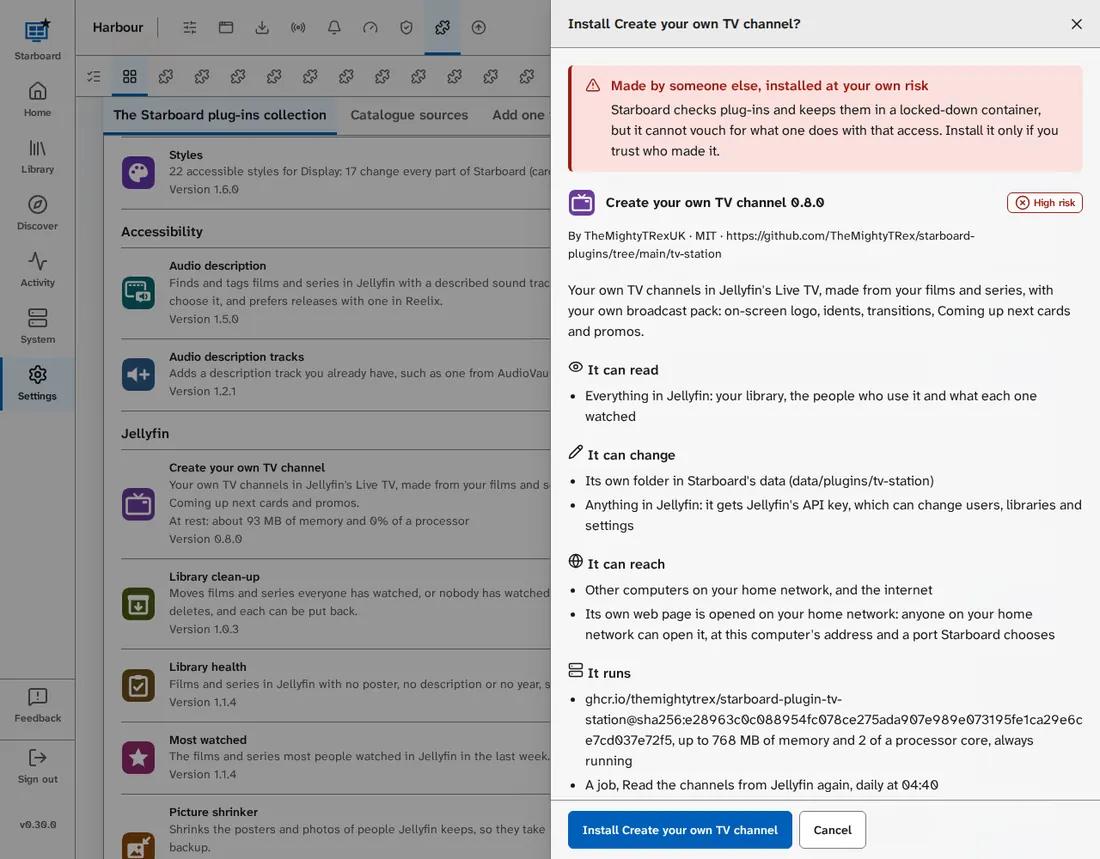
Starboard asks you before it gives a plug-in any of these. You can take one away later in Settings, then Plug-ins.
- Reads and changesUse your Jellyfin key
Signs in to Jellyfin as a helper, so it can find, tag or play titles.
jellyfin:key - Reads and changesTalk to things on your home network
Connects to apps and devices at home, and to the internet.
network:lan - ChangesOpen its own web page
Gives the app a page on your server, which you open in a browser.
network:port
It can read
- Use your Jellyfin key
- Talk to things on your home network
It can change
- Use your Jellyfin key
- Talk to things on your home network
- Open its own web page
What it needs
- Starboard
- Needs Starboard 0.19 or later. Its manifest asks for plug-in API 1.15 or later, up to but not including 2.0.
- Other apps
- Jellyfin, already set up.
- In practice
- Jellyfin set up in Starboard. Setting up the channels, the schedule grid and the broadcast pack need a desktop browser. A broadcast pack is optional, and an example pack, Example TV, is offered.
- System tags
- jellyfin. These are the names in the manifest that Starboard checks before it adds the plug-in.
- A web page
- It opens its own page on your server.
What it uses
Two kinds of figure appear here, and each row says which. Measured figures were read from a running plug-in. Declared figures are limits written in its manifest. Where nothing is measured, it says so.
| What | Figure | Kind | Note |
|---|---|---|---|
| Memory at rest | About 93 MB | Measured | The middle of the samples taken. |
| Most memory seen | 93 MB | Measured | The largest of the samples. |
| Memory limit it is given | 768 MB | Declared | The most it may use before Docker stops it. |
| Processor at rest | About 0% of one core | Measured | |
| Processor limit | 2 of a core | Declared | |
| Process limit | 128 | Declared | The most programs it can run at once. |
| Image on disk, unpacked | 75 MB | Measured | The size of the container's image on the server. The smaller size it downloads at is not read. |
| Disk for its own data | Not measured yet | Not measured | Its folder in Starboard's data. |
| Network | Your home network and the internet. Opens its own web page on your home network. | Declared | main: port 8080 |
| Containers | 1 (main) | Declared | |
| Runs | All the time | Declared | |
| Asks to read or change | 3 things: the list above | Declared |
Measured on 23 November 2026. docker stats, 6 samples 4 seconds apart, on the maker's server, containers as they were running; image size is the unpacked local size.
On a test server
It did not run cleanly on the test server. Did not stay running on the test server (plugin-tv-station-main stopped; exit 1, killed by memory limit: false) Measured on a test server with made-up data, 25 November 2026, Starboard 0.30.0. Machine: Linux x86_64, 12 cores, 16 GB memory.
Versions and notes
Version 0.8.0
Latest23 November 2026Added
- Break grids: two grids for each channel, In between programmes and Breaks, with up to 7 columns. Choose Random, Sequence, Day of week, or Morning, afternoon and evening, then drag items into the columns, or use the buttons and the keyboard.
- Where breaks go inside a programme: at silence, at set times or at the end of a scene, and how many in each 30 minutes and in a film. Found once for each programme in the quiet hours, never while a channel streams.
- A channel that has not changed its grids plays exactly as before.
Version 0.7.0
22 November 2026Added
- Audio description on promos (not active unless you activate it): a voice says each promo's words, so a blind viewer hears what is coming, on which channel, and when. It is made on your server, in the station's language. Nothing is sent anywhere.
Version 0.6.0
21 November 2026Added
- Language (English unless changed): the words drawn on the picture and in the guide, such as Coming up next, Series and episode and the day and time, in English, French, German, Spanish, Italian, Portuguese, Dutch, Swedish, Danish or Norwegian.
- Sound track in your language: a programme with more than one sound track plays the one in the station's language, else its default track.
- Titles in your language: film and series titles, and film descriptions, are read in the station's language from the film database for programmes about to be shown, a few each hour, and kept. Episode names stay as Jellyfin has them.
Version 0.5.7
21 November 2026Fixed
- Moving a programme with the keyboard on the schedule grid: focus goes straight to the programme at its new time, so a screen reader no longer reads the old time first, and the reason a move cannot be made is said once the actions have closed.
Version 0.5.6
20 November 2026Changed
- Busy buttons on the schedule grid show a turning ring while Starboard works, such as Suggest a week, the same as the rest of Starboard.
Version 0.5.5
19 November 2026Added
- Leave out 3D films (Yes unless changed): a film Jellyfin or its file name says is 3D is left out of channels, and each film is checked once in quiet hours for two pictures side by side or one over the other.
Fixed
- Reading the channels again updates each programme's details, such as which sound track it plays, its title and its picture, even when the programmes are the same. The schedule does not change.
Version 0.5.4
19 November 2026Fixed
- A programme with a subtitle file beside it showed only the channel's name card: the plug-in asked for the subtitle in place of the sound. It now picks the sound among the file's own sound tracks.
Version 0.5.3
19 November 2026Fixed
- Pack logo check: a busy plug-in no longer refuses a logo as having no transparent parts; it tries again, then says to upload the pack again in a minute.
Version 0.5.2
19 November 2026Added
- The station's logo on promos: promos made with a channel's own pack, or a plain design, show the station pack's logo, small, in a corner. To leave it out, deactivate Show the station's logo on promos.
Version 0.5.1
19 November 2026Fixed
- Promos follow a new pack: when a channel's broadcast pack changes, its promos made with the old pack stop showing and are made again in the next quiet hour.
Version 0.5.0
19 November 2026Added
- Promos and clips in each break: up to 2, 3, 4 or 6, each once, on a channel's Breaks card. The holding slide fills the rest.
- Extra videos: upload as many as you like for the station or one channel. One plays at random after the promos in each break.
Changed
- Breaks: between programmes a bumper, promos, an extra video, the holding slide, then the ident. Inside a programme a bumper, promos, an extra video, the holding slide with Back soon, then a bumper.
Version 0.4.0
19 November 2026Added
- Bumpers: a broadcast pack may have short, silent bumpers in bumpers/. One opens and one closes every break.
- Breaks inside programmes: where a programme fades to black for its adverts (found in quiet hours), a bumper, trailers or promos and a bumper play. Up to 1, 2 or 3 minutes, taken from the break after it.
Changed
- A break's order: a bumper, trailers and promos, the holding slide or cards, a bumper, then one ident with its music immediately before the next programme.
Version 0.3.2
19 November 2026Added
- Create initial schedule on a channel's What it shows card: a week from the channel's own series and films, in the hours you give, ready to change in the schedule grid and save.
- This channel's line-up in Suggest a schedule: every series and film the channel shows, watched or not.
Version 0.3.1
19 November 2026Changed
- Preview a frame of a Coming up next card or a promo is taken 1.5 seconds into the pack's background video, so a background that opens with a movement, such as bands sweeping off, shows as it rests.
Version 0.3.0
19 November 2026Added
- Animation on and off: the cards, straps, on-screen logo, clock, label and holding slide words can fade, slide in from the left, right or bottom, wipe or grow, and go off the same ways, quick, normal or slow. Choose on the Animation page or a channel's Animation card, with a preview of each.
- A broadcast pack can choose its animation in pack.json, under animation. A choice in the settings comes first.
- Each channel remembers what it has played to someone watching: From the next episode not watched counts an episode it played, 70% or more of it, as watched, as well as what Jellyfin says. Jellyfin's watched marks are never changed.
- Played on this channel: a new card on each channel lists the last few programmes it played, with a way to forget them.
- Promos with the programme's sound: each clip plays with its own sound, and the music goes down to 20% under it (10%, 20%, 30% or 50% in Music under the programme's sound).
- Promo length from 10 to 60 seconds, and Clips in each promo, about one every 5 seconds unless you choose 2 to 6.
- Background loops for promos: upload several videos or pictures for the station or one channel; each promo chooses one at random with the pack's.
Changed
- From the next episode not watched finds the first episode, in the channel's order, that is not watched, where before it took the first not played in Jellyfin's order.
Version 0.2.1
19 November 2026Added
- Choose the hours a suggestion fills: Suggest a schedule asks for the hours to fill on weekdays and at the weekend, such as 18:00 to 23:00, and fills them one programme after another, leaving out one that would run past the end. The hours are remembered for each channel.
Changed
- Longer holding slides: a holding slide's video may be up to 120 seconds and 90 MB. Starboard 0.24.1 or later takes files that big; an older Starboard stops at 60 MB.
Version 0.2.0
19 November 2026Added
- Choose from your library: with Starboard 0.24.0 and later, a slide-out lists every series, film, collection, playlist, genre and decade in Jellyfin, with search; tick several and add them to a channel at once. Those on the channel already show as added.
- A holding slide: upload a picture or a short video, with Back soon or a countdown to the next programme and its name. It loops at the end of each break, after the promos, until the next programme starts, so the channel never shows black.
- Music for promos: upload MP3, M4A, OGG or FLAC music for the station or for one channel, list it and remove it. Promos use it with, or in place of, the pack's music, and a channel with music but no pack promo gets plain promos on its colour.
- Jellyfin's guide: the Guide page says when Jellyfin last read the guide and how many programmes it had, and Refresh Jellyfin's guide in Actions asks it to read it again.
- Suggest a schedule asks what to make it from: Watch history, General watch history, All TV, All films or TV and Films, and remembers the choice for each channel.
- Logos show on their rows: a channel's logo and the station pack's on-screen logo show as a small picture once uploaded.
Changed
- Channels in cards: with Starboard 0.24.0 and later, each channel is a card in the list, and an opened channel has a card each for its name and number, what it shows, its breaks, its on-screen logo and branding, its holding slide and promos, and its programmes for today and tomorrow.
- Changes save in place: with Starboard 0.24.0 and later, a change answers with that channel only, so the page keeps the open channel, where you were and focus, and says what was saved, such as Corner: Bottom left.
- Renaming the station renames its tuner in Jellyfin's Live TV.
Fixed
- The schedule grid opens: with Starboard 0.24.0 and later, Open the schedule grid uses the address you opened Starboard with, so it opens from any address that reaches the server. With no channels, the grid page says what to do.
Version 0.1.1
19 November 2026Changed
- Its address for Jellyfin fills in by itself: with Starboard 0.23.0 and later, Starboard gives it its address on your home network, so Jellyfin's Live TV works without opening its page first.
Fixed
- Channel names and numbers are accepted: with Starboard 0.23.0 and later, Add a channel, Rename and Change number take plain text, not only web addresses.
Version 0.1.0
17 November 2026Added
- Your own channels: name the station and each channel, with its number, logo and colour, and fill it from series, films, collections, playlists, genres or decades, in order or shuffled, with episodes of a series in a row.
- Schedule grid: place films and series at set times on a week's grid, by dragging or with buttons and the keyboard; copy a day; stripe a series across weekdays; choose where a series starts; suggest a week from watch history.
- In Jellyfin's Live TV, first: numbered from 1 in your order, with a 7-day guide of titles, episode names, synopses, pictures and New or Repeat. Tuning in joins part way through, as on television.
- Breaks: idents, Jellyfin's trailers, your own clips, and Coming up next and Later cards with the programme's picture, title, date and time and a short synopsis.
- Broadcast pack: your own branding from a zip made from the template: the on-screen logo, the logo with its music, idents in a random order, transitions, and Coming up next and promo backgrounds. Every file is checked first. Or try the example pack.
- Promos: made in quiet hours from short clips of a programme coming up, a music bed from the pack and its day and time from the schedule, kept and replaced as the settings say, and shown on your other channels too.
- Downloads: the template, with pack.json, its schema and a README, and placement guides for the Coming up next card, the promo and the on-screen logo.
- On-screen logo: the channel's logo or name in a corner you choose, with its size, opacity, a clock, a New, Repeat or Live label and a backing plate, for the station or each channel, with a preview.
- Light: nothing runs until someone chooses a channel, viewers of a channel share one stream, and it stops 30 seconds after the last one leaves.
Help
The plug-in help centre explains what Create your own TV channel does, how to set it up and what to do when it does not work.
How to install in Starboard
From Starboard
- In Starboard, open Settings, then Plug-ins, then Catalogue.
- Under Catalogue sources, paste
https://themightytrex.github.io/stallboard/catalogue.jsonand select Add catalogue. You do this once. - Find Create your own TV channel in the Catalogue and select Install. Starboard shows what it asks for, and you choose.
By address
Or give Starboard this plug-in's address: in Settings, then Plug-ins, then Catalogue, paste it under Add one from elsewhere.
https://raw.githubusercontent.com/TheMightyTRex/starboard-plugins/ef67f0c273140fd80637bd3b9c8feb7ed15b648f/tv-station/starboard-plugin.json
Who reviewed it
Reviewed by TheMightyTRexUK on 23 November 2026, version 0.8.0. Listed on 23 November 2026. Its manifest was last read on 23 November 2026. What Reviewed means.
Report a problem with this plug-in
Something wrong with Create your own TV channel itself? Tell its maker. The report goes to the plug-in's own issue page, not to Stallboard.
Report a problem with this plug-in (opens in a new tab)
A problem with Stallboard, such as this page? Use the Send feedback button.
More in Jellyfin
-

Direct play
Jellyfin
Stop Jellyfin converting films while people watch.
- Jellyfin only
Needs Starboard 0.18 or later
About 8.6 MB of memory at rest
-

Library clean-up
Jellyfin
Tidy watched films into a holding folder. Never deleted.
- Jellyfin only
Needs Starboard 0.19 or later
Memory use not measured yet
-

Library health
Jellyfin
Find films with no poster, no description or no year.
- Jellyfin only
Needs Starboard 0.18 or later
Memory use not measured yet
-

Most watched
Jellyfin
What your household watched most this week.
- Jellyfin only
Needs Starboard 0.18 or later
Memory use not measured yet