Check a page for accessibility problems
How-to
Run an automatic check of the page you are on. Snaglist lists each problem it finds, shows you where it is, explains how to fix it, and lets you report one problem or all of them.
Before you begin
- The site must offer 'Check this page for accessibility problems' under 'Send feedback'. Site owners activate it with Activate the accessibility check.
Steps
- Go to the page and select Send feedback.
- Under Check the page, choose Check this page for accessibility problems, then select Continue. Snaglist checks the page; it takes a moment.
- Read the list. Each line names a problem, how many times it was found, and the WCAG criterion it breaks.
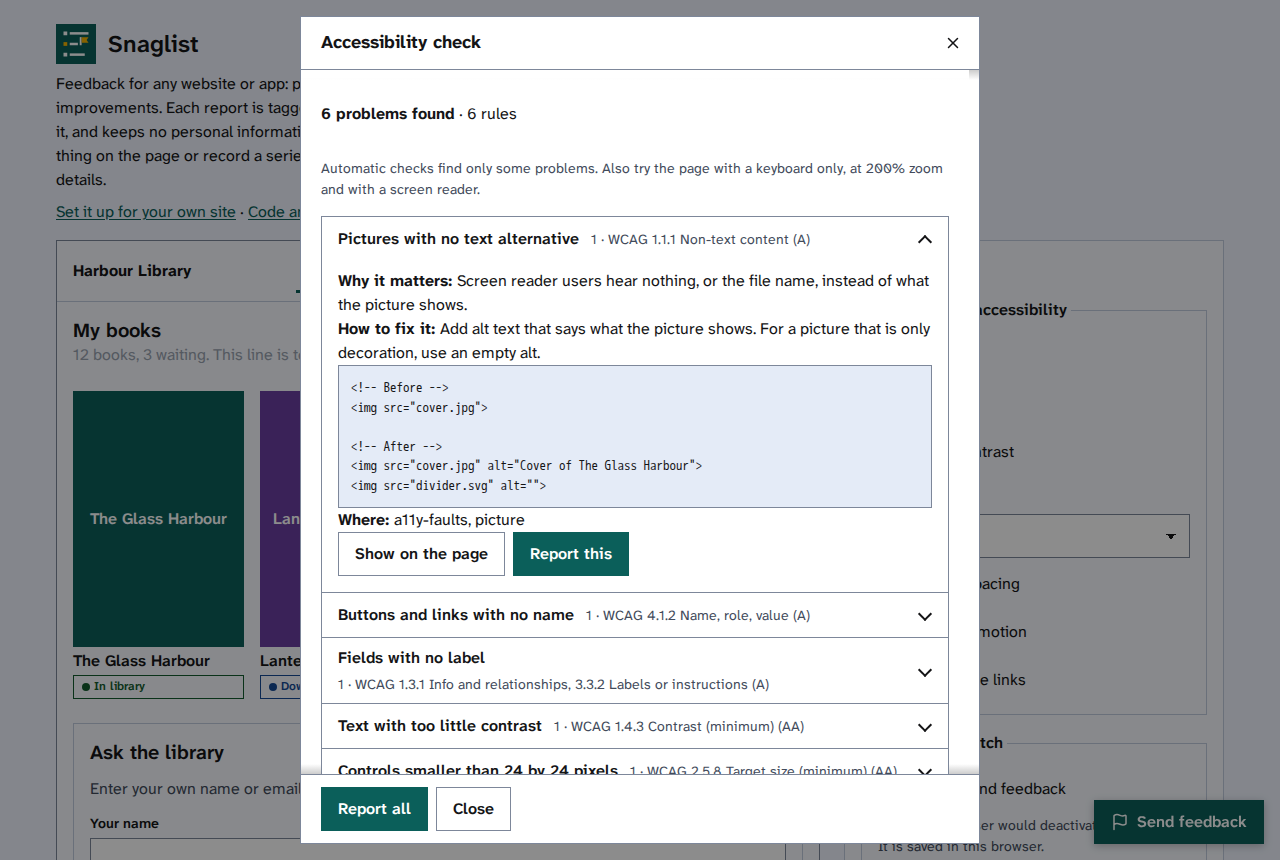
- Select a problem to open it. You will find why it matters, how to fix it with example code, and where it is.
- Select Show on the page to close the window and outline the first place it was found.
- Select Report this to report that problem, or Report all for one report with every problem.
- Check the report in What is sent, then send it: Check what is sent, then send it.
Things to note
- Automatic checks find only some problems. Also try the page with a keyboard only, at 200% zoom and with a screen reader.
- Each report lists up to 10 places for each problem, by CSS selector, so a developer can find them.
- The check reads the page in your browser. Nothing is sent until you choose to report.