On this page
How-to
Add a description track you have
Add a description track you already have, such as one from AudioVault, to its film or episode. The plug-in checks that the track is as long as your copy of the film, then adds it next to the film as an extra sound track. The film's own file is never changed, and nothing is ever deleted. This takes 8 steps.
Before you begin
- Audio description is installed. Read Install Audio description.
- You have the track: get it yourself, for example from AudioVault after signing in there, and keep to its rules. The plug-in downloads nothing from any website.
- The track is one of these: MP3, M4A, M4B, AAC, MKA, Opus, Ogg, FLAC or WAV, or a zip of them, up to 1 GB.
- Jellyfin can write in your film and series folders. If it cannot, the track says Not added with the reason.
Steps
- Name the file as the film and its year, such as
The Long Field (2022).mp3, or a series with its episode, such asQuiet Valley S01E03.mp3.1x03works for an episode too. - Go to Dashboard, Plugins, Installed, select Audio description, then Settings.
- Under Add a track you have, then Upload a description track, select the file chooser (Choose File, or Browse in some browsers) and choose the file. A screen reader names it Choose a description track.
- Select Upload the track. The file goes into the folder for description tracks.
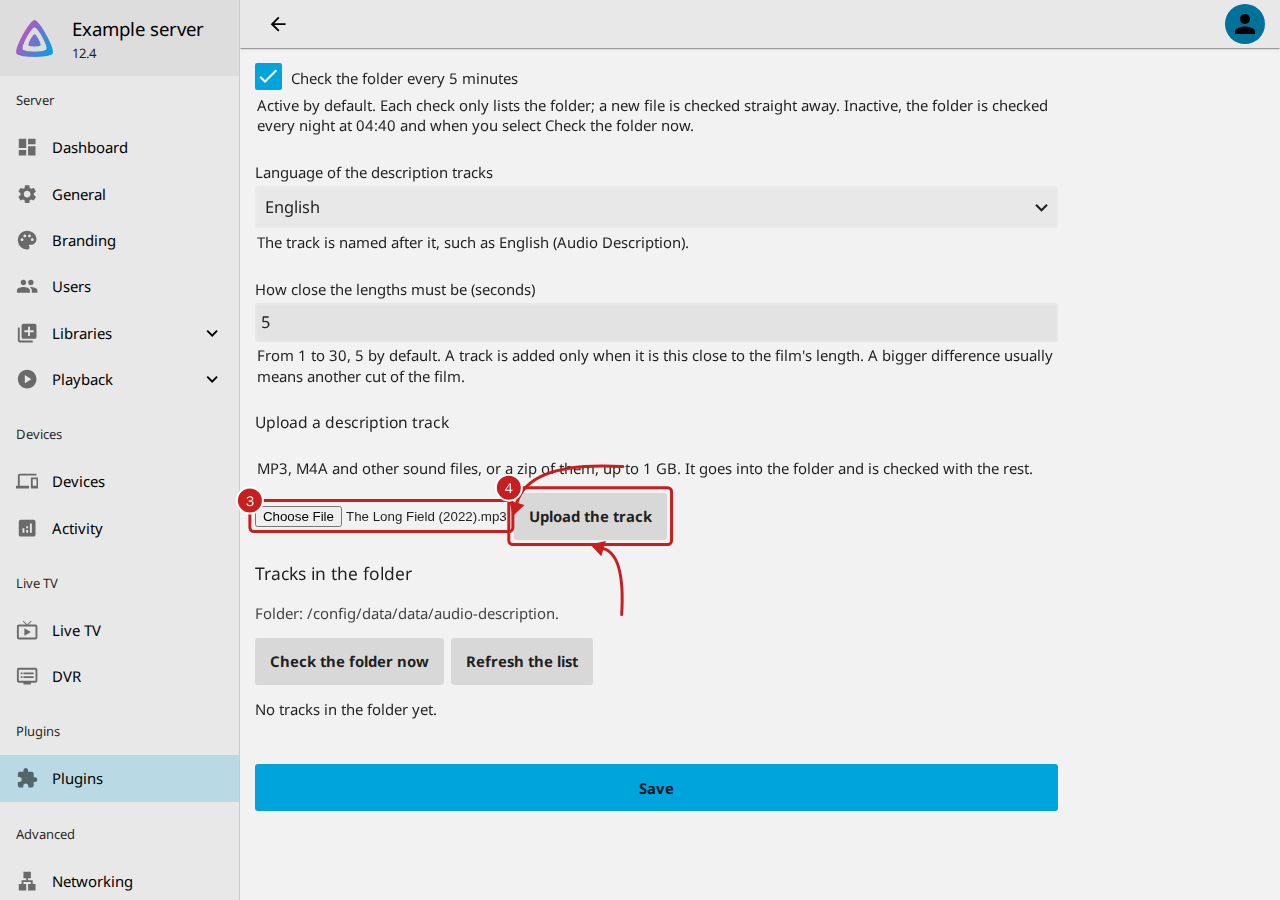
You can also put the file in the folder yourself. Folder for description tracks names it; empty, it is
audio-description in Jellyfin's data folder (/config/data/audio-description in the official Docker image,
/config/data/data/audio-description in the LinuxServer.io image).
- Under Tracks in the folder, select Check the folder now. While Check the folder every 5 minutes is active, the default, a new file is checked within 5 minutes anyway.
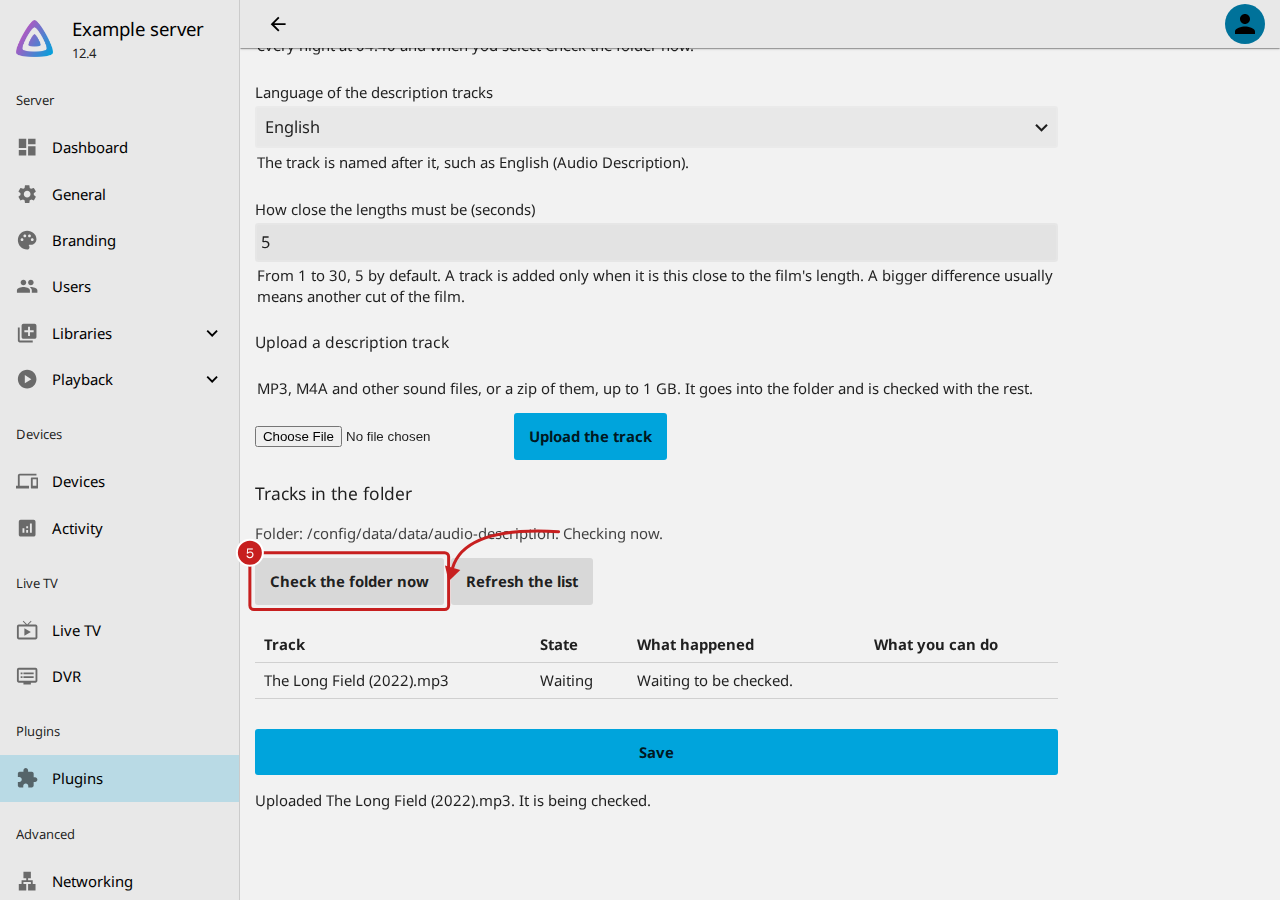
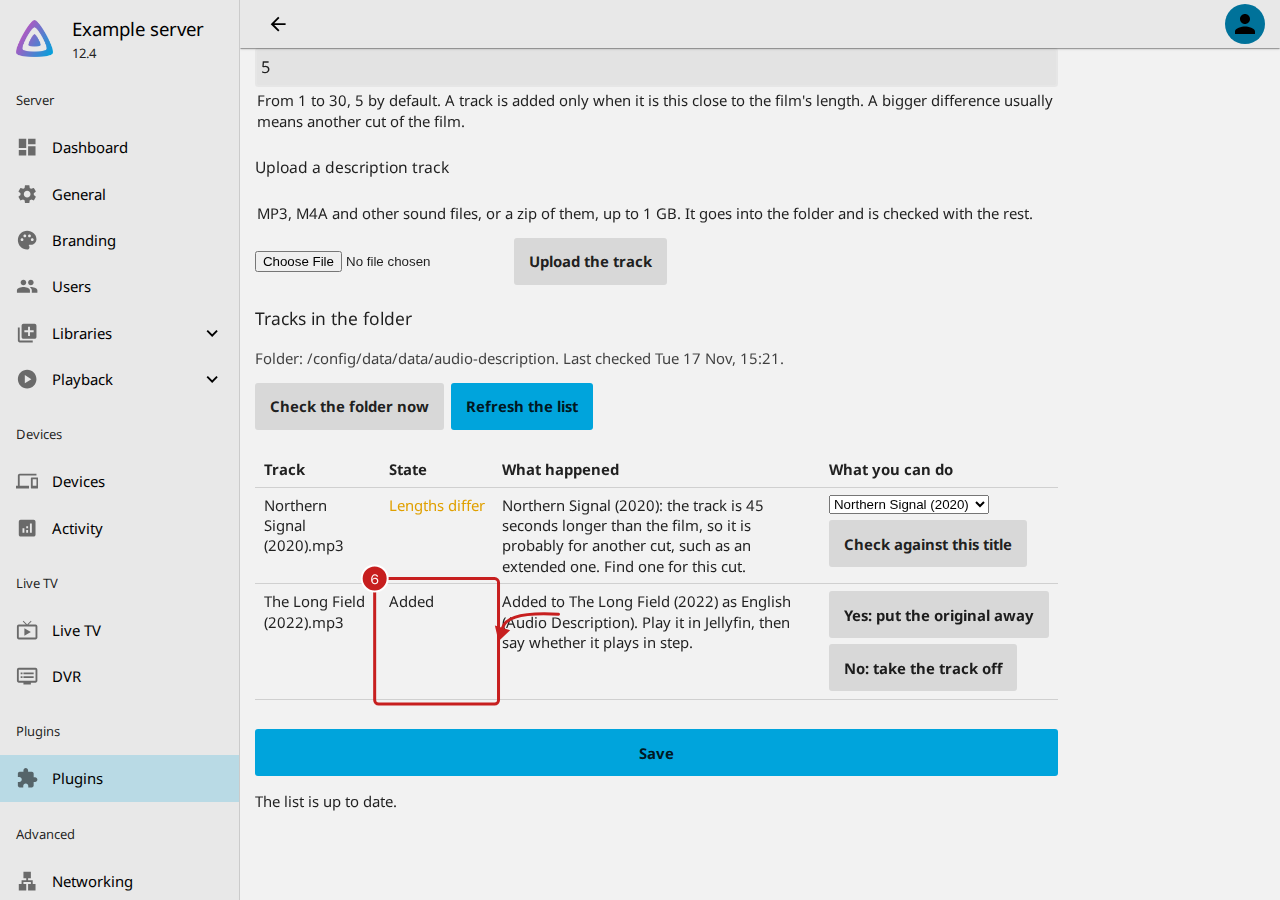
- Read the track's State. Added means the lengths agreed and the track is next to the film; What happened says which film it went to. Any other state says what happened and what you can do: read The states.
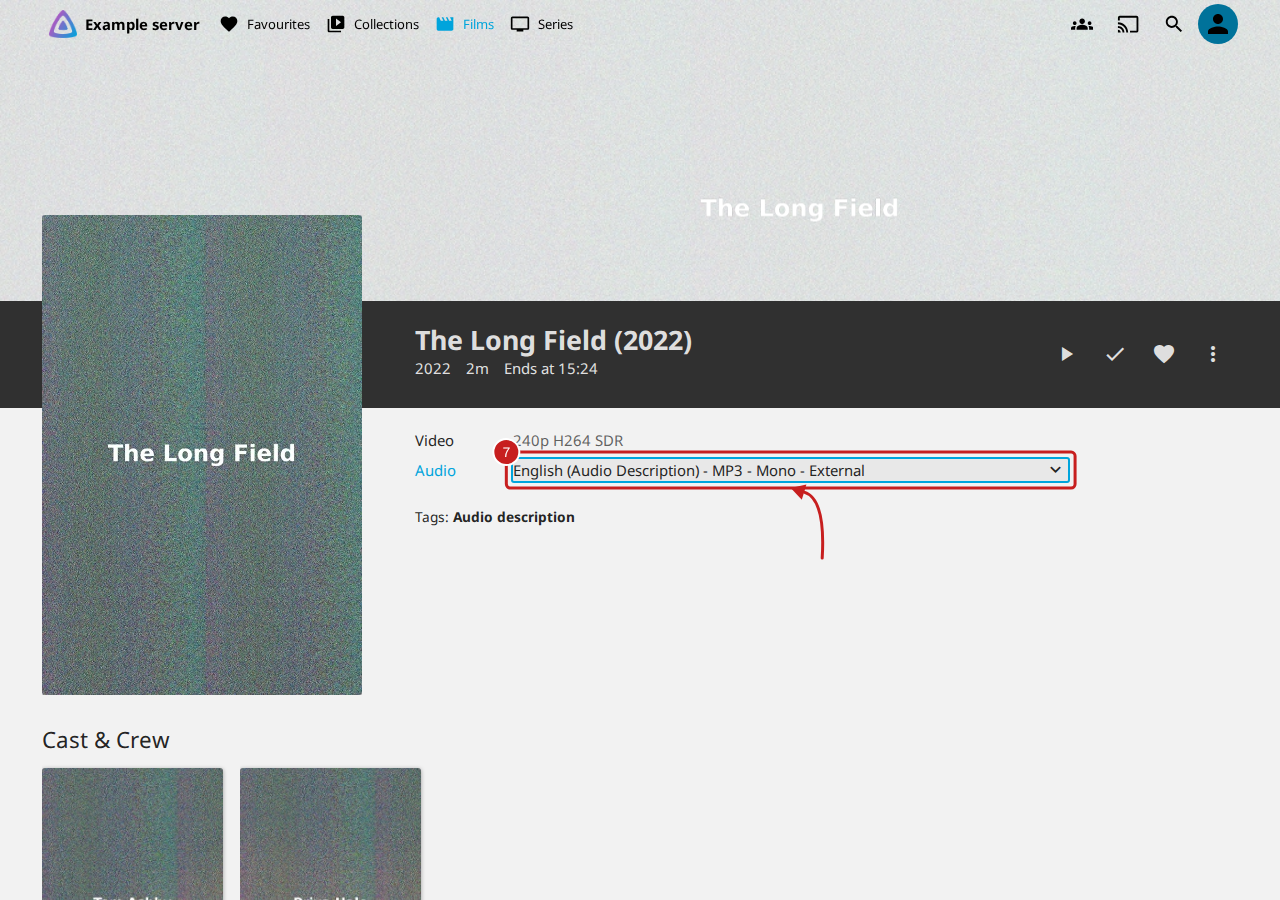
- Play the film in Jellyfin and choose English (Audio Description) in Audio on its page, or in the player's sound track menu. Listen for a minute or two, at the start and later on.
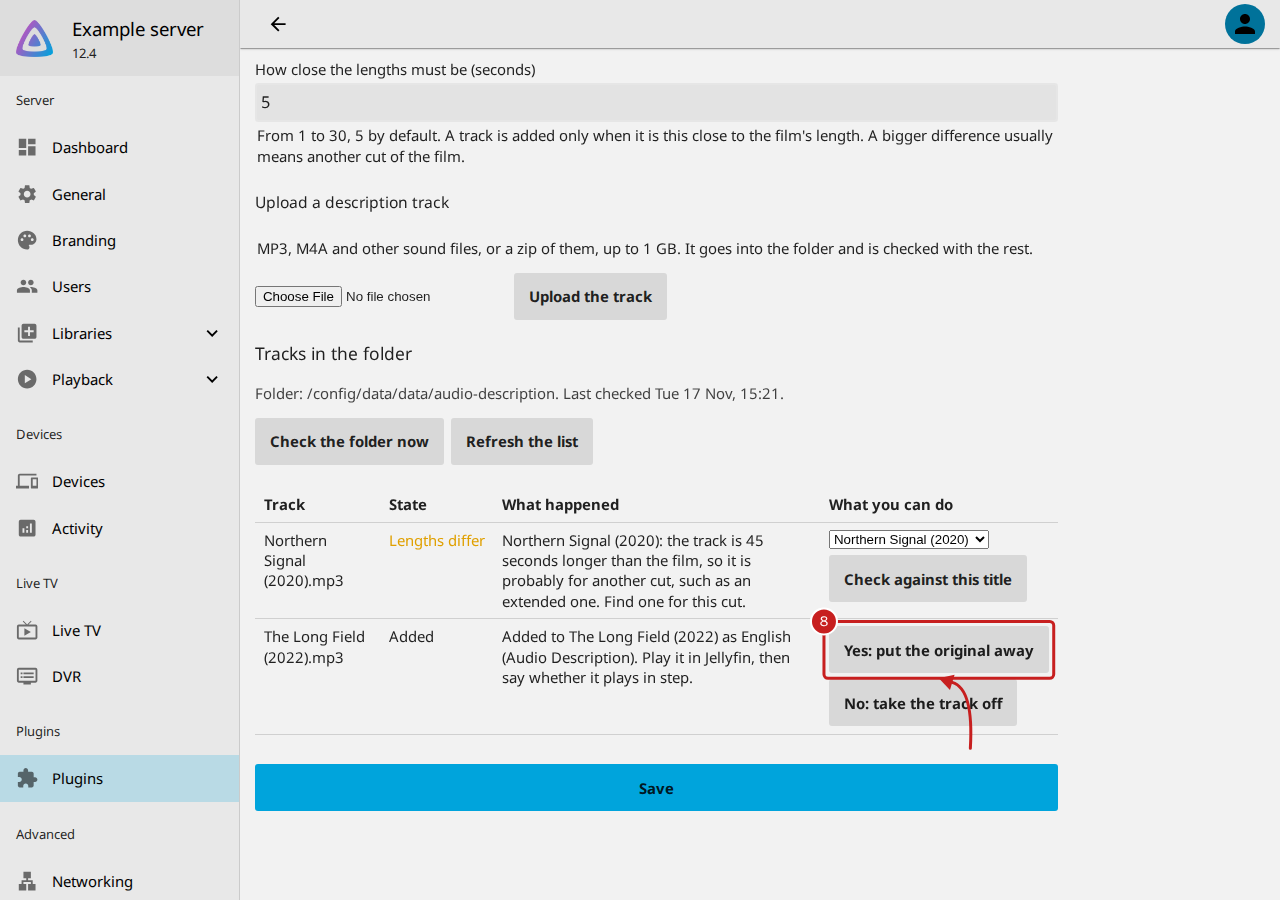
- Back on the settings page, say whether it plays in step: - Yes: put the original away moves the file you added to the Confirmed folder, inside the folder for description tracks. - No: take the track off moves the added track to the Taken off folder, and Jellyfin no longer lists it.
The length check
A description track is made for one cut of a film. The plug-in copies the sound into a hidden Matroska file without converting it, using Jellyfin's own ffmpeg, so its length is exact. It compares that length with the film's, read by Jellyfin's own ffprobe.
- When they agree within 5 seconds, it moves the copy next to the film, as
The Long Field (2022).Audio
  Description.eng.mka
, titled English (Audio Description), marked for people with a visual impairment and not the default track. Then it asks Jellyfin to read the film again. - To allow more or less, change How close the lengths must be (seconds), from 1 to 30, and select Save.
- Language of the description tracks sets the language and the track's name, such as English (Audio Description).
The states
| State | What it means | What to do |
|---|---|---|
| Waiting | Not checked yet | Select Check the folder now |
| Added | Added next to the film | Play it, then select Yes or No |
| Confirmed | You said it plays in step | Nothing: the file you added is in Confirmed |
| Taken off | You said it does not | Choose a title to try again, or find another track |
| Lengths differ | The track is longer or shorter than your copy: probably another cut | Find a track for your cut, or line it up yourself |
| Choose the title | More than one title could match the name | Choose the right one, then Check against this title |
| No match | Nothing in Jellyfin matches the name | Rename the file as the film and year, or the series and episode |
| Already described | The title already has a described sound track | Nothing, or choose another title if this is wrong |
| Already added | A description track file is already next to it | Nothing: it is never replaced |
| Out of reach, Cannot read, Cannot read film, Not added | The file or the film could not be read or written | Read Audio description is not working |
When the lengths differ
A difference of more than a few seconds almost always means your copy is another cut: an extended edition, a director's cut, a version with different studio logos at the start, or a broadcast with its own credits. The plug-in says how much longer or shorter the track is and does not add it. Find a track for your cut, or line the track up yourself with describealign (opens in a new tab), then put the result in the folder.
What it never does
- Download from, or read pages of, any website, AudioVault included.
- Change a film's own file, or replace a description track that is already there.
- Delete anything of yours. It moves files to Confirmed, Taken off and Unzipped inside the folder, and you delete them there when you like. The only files it removes are its own hidden working copies.
Find out more
This page on GitHub, where the help is written.