On this page
How-to
Balance the files
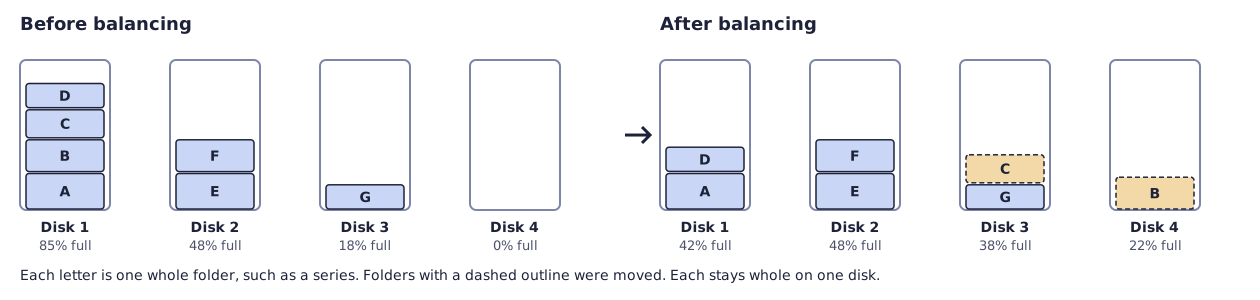
Balancing moves whole folders, such as a series, from fuller disks to emptier ones in the pool. The pool shows every file in the same place all the time, so the apps notice nothing.
Before you begin
- The pool has two disks or more. Read Add a disk to the pool.
- Have your Starboard password ready.
- Balancing can take hours: about 1 hour for each 280 GB moved. It runs at low priority, so films still play.
Steps
- Go to System, then Storage, then Pool.
- Select Balance the files.
- Under Balancer, select Starboard's balancer (recommended).
- Leave Pause during download hours selected to keep the disks free for downloads at those times. Read Set download hours.
- Select Continue to Check. Nothing moves yet.
- Read the check: each disk before and after, and the folders it moves.
- Select Continue to Confirm, enter your Starboard password and select Start balancing.
- Wait, or go back to the Pool page. Last change shows how many folders have moved. To stop, select Stop after this folder.
How it works
Each folder is copied to the emptier disk, checked against the original, then removed from the fuller one:

- The balancer moves the biggest folder that fits from the fullest disk to the emptiest one. It stops when every disk is within 5 percentage points of the same fill, or no folder fits.
- A folder is three levels down in the pool, such as
media/tv/A series. Loose files higher up move on their own. - Folders changed in the last hour stay where they are, because a download may still be writing them.
- If it is stopped, or the power goes off, the folder being moved is still whole on the disk it came from. Folders already moved stay moved.
What happens without balancing
The pool works without balancing. New files go to the disk with the most free space, so the disks even out slowly. Until they do:
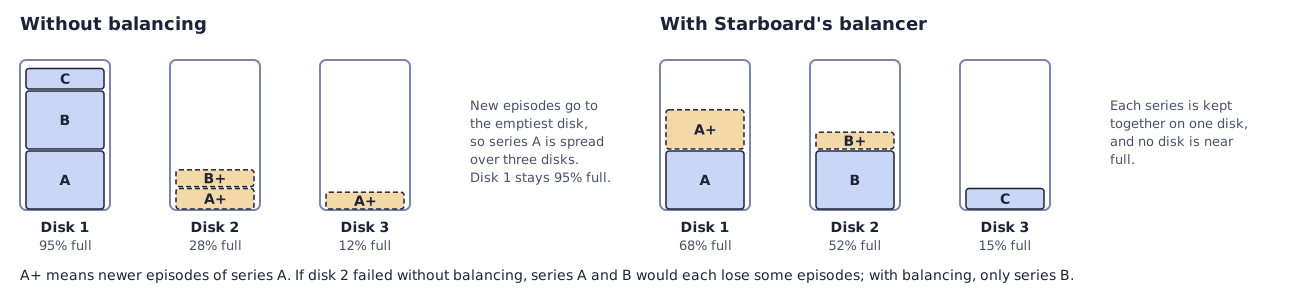
- A series ends up on several disks. If one disk fails, many series lose a few episodes each, instead of a few series being lost whole, which a parity disk can rebuild.
- The old disks stay nearly full. A disk over 90% full is slower, and files that grow may have nowhere to go on it.
- One disk does most of the work, because every new file goes to it.
mergerfs.balance
mergerfs.balance is a balancer from the mergerfs-tools project. It is not installed with Starboard. It moves
single files until the disks are even, so a series can end up spread over several disks, and it has no check
before it starts. To use it, install it from the mergerfs-tools project,
then select it under Balancer.
If it does not work
- Nothing needs moving: the disks are already within 5 percentage points of each other.
- No Balance the files button: the pool has only one disk.
- Some folders were left where they were: they changed while being moved, or the same folder was already on the other disk. Balance again later.
- It is paused: it is download hours. It carries on when they end.
Find out more
This page on GitHub, where the help is written.